

Your project tool is changing, but that's not the real problem… The real problem is the one Project Online never solved either.
On September 30, 2026, Microsoft pulls the plug on Project Online. There’s no grace period and no read-only mode. After that date, your projects, your data, and your reporting are just gone. If you haven't migrated by then, you've lost it all.
But here's the thing nobody's telling you in the flood of "Top 10 Project Online Alternatives" articles: picking a new project tool is the easy part. The hard part is fixing the gap between project delivery and business outcomes that Project Online never closed in the first place.
We'll get to that. First, let's deal with the facts.
Key Dates for the Project Online Retirement
Microsoft announced the retirement in September 2025. The timeline is tighter than it looks:
- October 1, 2025: Sales ended for new Project Online-only SKUs.
- April 1, 2026: No new Project Web App sites can be created. Tenants without at least one project get locked out.
- April 2, 2026: SharePoint 2013 workflows shut down. This is the one that catches people off guard. If your PMO uses workflow-driven approvals, stage gates, or demand management in Project Online, those processes break six months before the platform goes dark.
- September 30, 2026: Official retirement. Everything becomes permanently inaccessible.
The SharePoint workflow retirement in April means the governance layer, the part PMO leaders actually depend on, crumbles before the platform itself does.
Note that Project Desktop, Project Server Subscription Edition, and Microsoft Planner are not affected. This only hits the cloud-hosted Project Online service.
Microsoft's Migration Options for Project Online
Microsoft is giving its users some alternatives to migrate, but are they real solutions?
Path 1: Microsoft Planner Premium
This is Microsoft’s primary recommendation. It’s built on Dataverse, integrates with Teams, and includes Copilot features. It’s a good fit for teams running simple projects who want a modern, native experience.
However, enterprise PMOs will hit walls fast. Planner Premium caps at 3,000 tasks and is missing the resource pool management and portfolio-level forecasting that large PMOs depend on. Also, because the architectures are different, there is no "magic button" to migrate. You are essentially rebuilding from scratch.
Path 2: Project Server Subscription Edition (PSSE)
PSSE is the closest functional match to what you have now. You get the same PWA interface and the same enterprise scheduling features.
The downside is that you’re moving from the cloud back to on-premises. Your IT team will have to manage the infrastructure again, and you’re trading a hosting headache for a maintenance headache on a product that clearly isn't Microsoft’s strategic priority.
Path 3: Dynamics 365 Project Operations
This is the heavyweight option for firms that need to integrate project delivery with financials and ERP. It’s powerful, but it’s also expensive and complex. Unless you are already in the Dynamics ecosystem, this isn't a migration. It’s a full platform transformation.
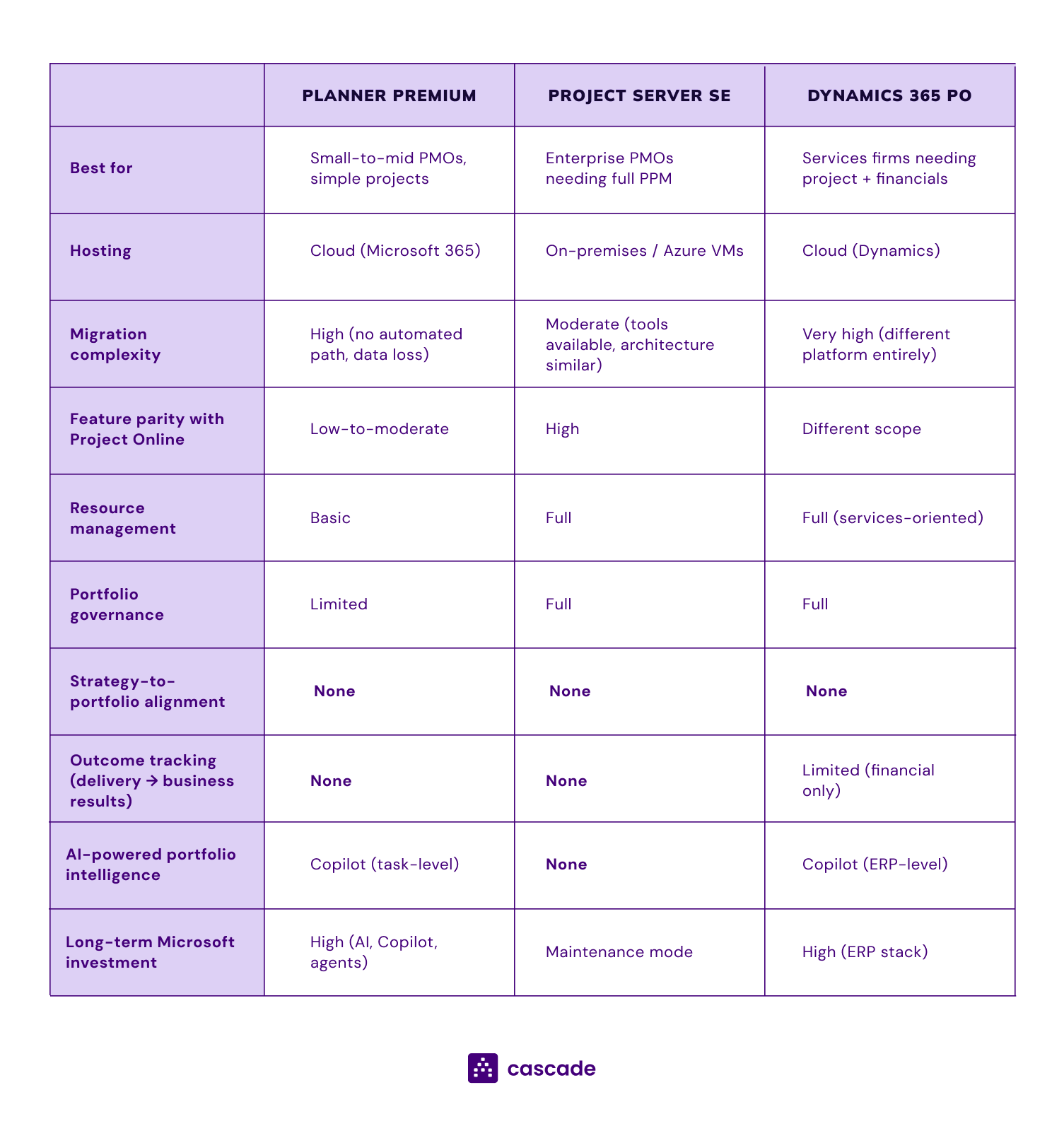
To be clear, none of these tools are "bad" at what they do. But if you look at the gaps in that table, you’ll see the same things missing across the board: strategy alignment, outcome tracking, and portfolio intelligence.
It's a gap that existed before Project Online retired, and this migration just makes it impossible to ignore.
Delivery vs. Outcomes: The Gap No Migration Fixes
Every article about this topic asks the same question: Which tool replaces Project Online?
We think that’s the wrong question.
Here's a better one: Did Project Online ever actually connect your project delivery to your business outcomes?
Ask yourself if Project Online ever actually connected your project delivery to your business outcomes. For most, the answer is no. It tracked tasks and budgets well enough, but knowing a project is "on schedule" is different from knowing if it’s producing the results the business paid for.
But the expectations on PMOs have shifted. Traditional PMO tools track delivery, but you're not accountable for delivery anymore, you're accountable for outcomes. The C-suite wants to know if the portfolio is producing results, they don’t really care if 87% of projects are green. That's a fundamentally different question, and it requires a fundamentally different system.
That gap between delivery and outcomes is what makes PMOs vulnerable. The CFO questions your budget because you can't prove what the portfolio is producing. Steering Committee meetings devolve into status updates because there's no outcome data to make decisions with. "Strategic alignment" shows up in your charter but never in your dashboards.
Project Online never solved that, and neither will Planner Premium, Project Server, or Dynamics 365. They're built to manage work, not to prove that work matters.
From Project Tracking to Strategic Portfolio Management
The PMOs that keep their seat at the table are the ones who can prove their portfolio is producing the outcomes the business funded.
To do that, you need to know if the right projects are in the portfolio. You need to see patterns that signal trouble before they become escalations. And leadership needs real-time intelligence to make priority decisions now, not during a review next quarter.
That requires a system that manages the operational reality of your portfolio (tasks, timelines, budgets, resources) and connects all of it to strategic outcomes.
This is what we built Cascade to do.
Strategy Execution Meets Portfolio Management
Most of the alternatives articles will point you to another project scheduling tool. We're going to make a different argument: this migration is your chance to stop treating strategy and execution as two separate systems.
Cascade is a strategy execution platform built for PMO leaders who need to do both: run portfolios and prove they're producing results.
.png)
Configure your PMO methodology in Cascade
Start with how your PMO actually works. Configure custom business objects like portfolios, projects, outcomes, value pools, and KPIs that match your methodology, not someone else's framework. Set up Gantt charts, timelines, milestones, tasks, and Kanban boards for execution tracking, with unlimited custom fields and rulesets around their use. If you ran a specific governance model in Project Online, you can rebuild it here and make it better.
Map every initiative to your strategy
Every initiative in your portfolio maps to the strategic pillar it serves, and intake and prioritization rules keep your pipeline clean and your portfolio strategic. In one view, you can see which strategic priorities have real execution behind them and which are still just words on a slide, so you can eliminate the work that doesn't move the needle and protect the work that does.
Track outcomes, budgets, and KPIs in one place
Connect every project to business KPIs pulled live from your ERP, Power BI, or Salesforce, and build custom scorecards that blend delivery health with KPI attainment so you're proving value realization at the portfolio level. Budgets, forecasts, OPEX, CAPEX, and benefits all integrate deeply with the metrics leadership actually cares about.
AI-powered governance and risk detection
Cascade's AI writes portfolio reviews and executive summaries from live quantitative and qualitative data, pulling context directly from MS Teams meetings, emails, and documents so you're not chasing project owners for updates. RAID logs, risk scores, heatmaps, and AI-powered risk detection work across your entire portfolio to surface dependencies and blockers before they require leadership intervention. You walk into every Steering Committee meeting prepared, with time left over to make actual decisions instead of debating status colors.
Integrations with your Microsoft and PM stack
Cascade sits above your PM tools, connecting natively to MS Teams, MS Project Desktop, Smartsheet, Jira, Asana, Monday.com, Power BI, Salesforce, and more. Your teams keep working where they work, with single sign-on through Microsoft and deep Copilot integration for automatic reporting from Teams meetings and documents. No new logins, no new workflows forced on anyone.
Enterprise-grade security and data residency
Cascade is SOC 2 Type II and ISO 27001 certified with AES-256 encryption and data residency options in the US, EU, and AU. Your data is isolated and never used to train public AI models.

When You Need a PM Tool, Cascade, or Both
A PM tool on its own is enough if your PMO manages a relatively small portfolio, your projects are straightforward, and leadership is mostly interested in whether things are on time and on budget. If your Steering Committee reviews are about delivery status and that's genuinely all the business asks for, a solid PM tool like Planner Premium, Smartsheet, or Project Server will cover you.
Cascade on its own makes sense if your PMO's primary job is strategic alignment, outcome tracking, and executive reporting rather than granular task scheduling. Some PMOs operate more as strategy offices than project management shops. If your teams handle their own execution in whatever tools they prefer and your role is connecting all of it to business outcomes, Cascade gives you that layer without forcing a PM tool change on anyone.
You need both when your PMO is accountable for delivery and outcomes, which is where most enterprise PMOs are heading. Your PM tool handles the scheduling, task management, and resource allocation. Cascade connects all of that to strategic priorities, tracks whether delivery is producing results, and gives leadership the intelligence they need to make portfolio decisions. The two systems talk to each other through native integrations so you're not maintaining anything manually.
The question to ask yourself: after your next Steering Committee meeting, will leadership know what got done, or will they know what it meant for the business? If you need both answers, you need both systems.
Why Now Is the Right Time to Add a Strategy Layer
You're about to spend months migrating your PM tool. That migration will consume IT resources, change management bandwidth, and leadership attention. Most PMOs will wait until the dust settles to think about strategy visibility, but we think that's a mistake.
If your strategy visibility depends on a single vendor's platform, you're one retirement announcement away from doing this all over again. A dedicated strategy layer means your portfolio governance survives the next platform change, whatever it is. Your PM tool decision actually becomes less risky when the strategic layer is independent from it.
Your data is also cleanest right now. You're already auditing portfolios, cleaning up project structures, and deciding what to carry forward. That's the natural moment to set up a strategy layer alongside the migration instead of going through that whole exercise again six months later.
And while every other PMO is heads-down on tool migration, you can leapfrog them by solving the problem they haven't even named yet.
Next Steps: Project Online Migration Guide
1. Triage or Stabilize Your Workflow Governance
The April 2 deadline has officially passed, and the SharePoint 2013 workflow engine is now dark. If you migrated early, use this week to hunt for "ghost processes", those minor notifications or edge-case triggers that might have slipped through your transition to Power Automate. If you haven't moved yet, your stage gates and approvals are likely frozen; you must identify projects stuck in a lifecycle state and establish manual "override" processes immediately to keep your portfolio moving.
2. Accelerate the "Great Export"
Do not wait for the September 30 retirement to begin your final data move. Unlike the workflow shutdown, the September deadline is a total plug-pull with no read-only mode, no grace period, and no data recovery options. Start exporting your project plans, task histories, resource allocations, and RAID logs now, because once that date hits, any data left in Project Online will be permanently deleted.
3. Stop Conflating "Tools" with "Strategy"
Don't let the technical urgency of the migration force you into a tool that only solves half your problem. It is critical to distinguish between your execution needs (scheduling, Gantt charts, and daily tasks) and your outcome needs (proving project value to the board). Replacing your scheduling tool solves the where do I click problem, but it won’t fix the gap between project delivery and business results that Project Online never closed in the first place.
4. Audit Your Outcomes, Not Just Your Tasks
Since you are already auditing your data for this migration, use this momentum to shift toward outcome-based governance. Instead of simply moving "green" status bubbles to a new system, ask whether each project is actually producing the results the business funded. Book a demo of Cascade to see how AI-powered portfolio intelligence and strategic alignment mapping can create a governance layer that survives this migration and provides the visibility leadership actually demands.
Microsoft Project Online retires September 30, 2026. Your strategy shouldn't retire with it.

.png)


